

Path: Maintenance and Setup > Insurance > Insurance
About
The workflow below describes how to set up NextStep Billing to override the Rendering Provider (Loop 2310B) in an 837 file for a specific Insurance Payer and Activity Code. Please note you will need to follow the steps below for all Insurances and Activity Codes that need the override.
Add a record to the Insurance Override By Activity Code Form
- Navigate to the Master Insurance List by following the path above.
- Select an Insurance Payer from the list.
- Click the Override by Act Code button.

- In the Insurance Override By Activity Code List, click the Ok button.
- Click the Add button. The Insurance ID populates with the payer you previously selected.
- Select an Activity Code from the drop-down menu.
- Next, from the "Display these fields on Loop 2310B" dropdown, choose Person or Non-Person.

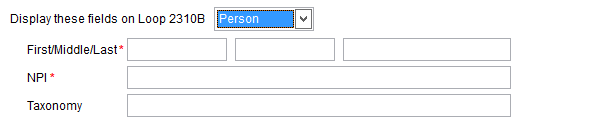
- Your dropdown selection will display different fields:
- If you choose Person, there will be First/Middle/Last name fields.
- If you choose Non-Person, there will be a single field for your entity's name. Selecting the non-person option will also properly format the name on the 837 file as a non-person.
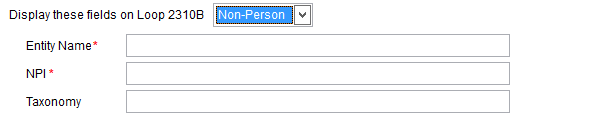
- Whether choosing a person or a non-person, the Name and NPI are required.
- If you choose Person, there will be First/Middle/Last name fields.
- After the required fields have been entered, click the Save button.
