

Beta Release Date: Monday, 12/8/25
Expected GA Release Date: Wednesday, 1/7/26
Feature Enhancements:
Release 7.15.0 | |
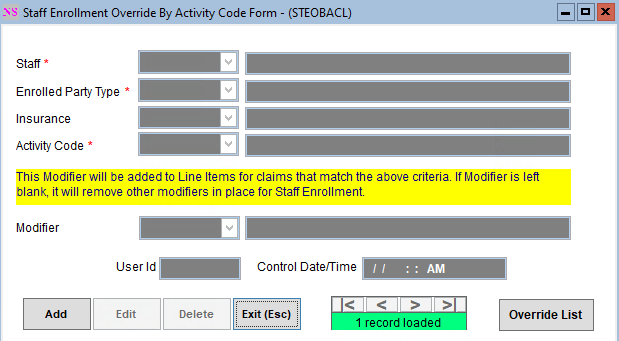
Add insurance to the Staff Enrollment Override By Activity Code Form | Maintenance and Setup > Employees > Staff > Staff > Enrollment List > Override By Act Code List
|
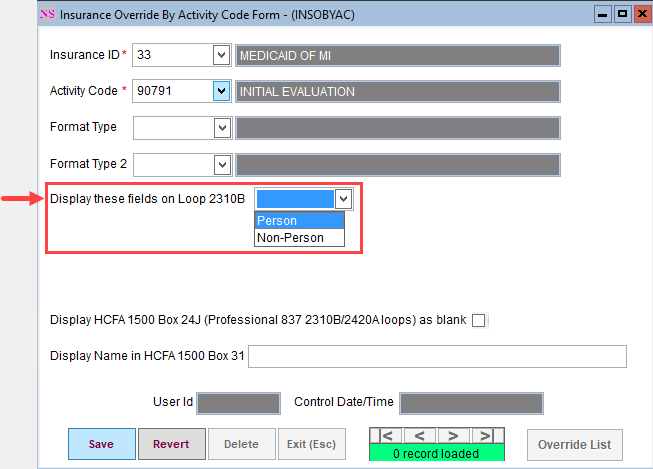
Add rendering provider override options to the Insurance Override By Activity Code | Maintenance and Setup > Insurance > Insurance Override By Activity Code This form now includes a setup option to choose which name, NPI, and optionally, taxonomy to populate in the Rendering Provider (2310B loop) per Insurance and Activity Code. It also provides an option to select a “Person” or “Non-Person”.
NOTE: For this override to take effect, “Display Rendering Provider info on 837 in 2310B Loop” must be checked on Page 2 of the Master Insurance Form. Additionally, if this form is filled out, it would override, per Insurance and Activity Code, the following setup options on the Master Insurance Form:
|
Allow the user to edit the Place of Contact on the Line Item Form | Line Items The user can now edit the Place of Contact/Service from the Line Items Form. |
| 835 Form and Working Queue: small usability upgrades | 835 Form > HIPAA 835 Inbound
835 Form > Working Queue
835 Form > Working Queue > Filters
835 Form > Working Queue > Transactions Pop-up
|
| Push Client Insurance details from Billing to the Scheduler's Insurance Information fields | The NextStep Scheduler will now populate the selected client’s current active insurances (up to two) from NextStep Billing in the Scheduler’s Insurance Information section on the left-side menu. NOTE: This change requires the NextStep Clinical 11.19.0 release |
Issues Resolved:
Release 7.15.0 | |
Fix Loop 2310D by not populating an address on the claim | Maintenance and Setup > Insurance > Insurance > Page 2 After correcting the functionality of the "Display 2310D Loop on 837” checkbox, it was found that this loop incorrectly populates an address in the 837 file. The address has been removed from this loop. |