

Release Dates
Beta: 12/7/25 11.19.0
GA: 12/14/25 11.19.1
Hotfix: 1/18/26 11.19.2
Hotfix: 3/8/26 11.19.5
Feature Enhancements:
Release 11.19.0 | |
Rich Text formatting added to Form Body Text fields | Admin Tools > Form Builder Body Text DISPLAY ONLY fields now support Rich Text Format (like bold, italics, headers), so you can create professional-looking forms for viewing and printing. See below for an example form: 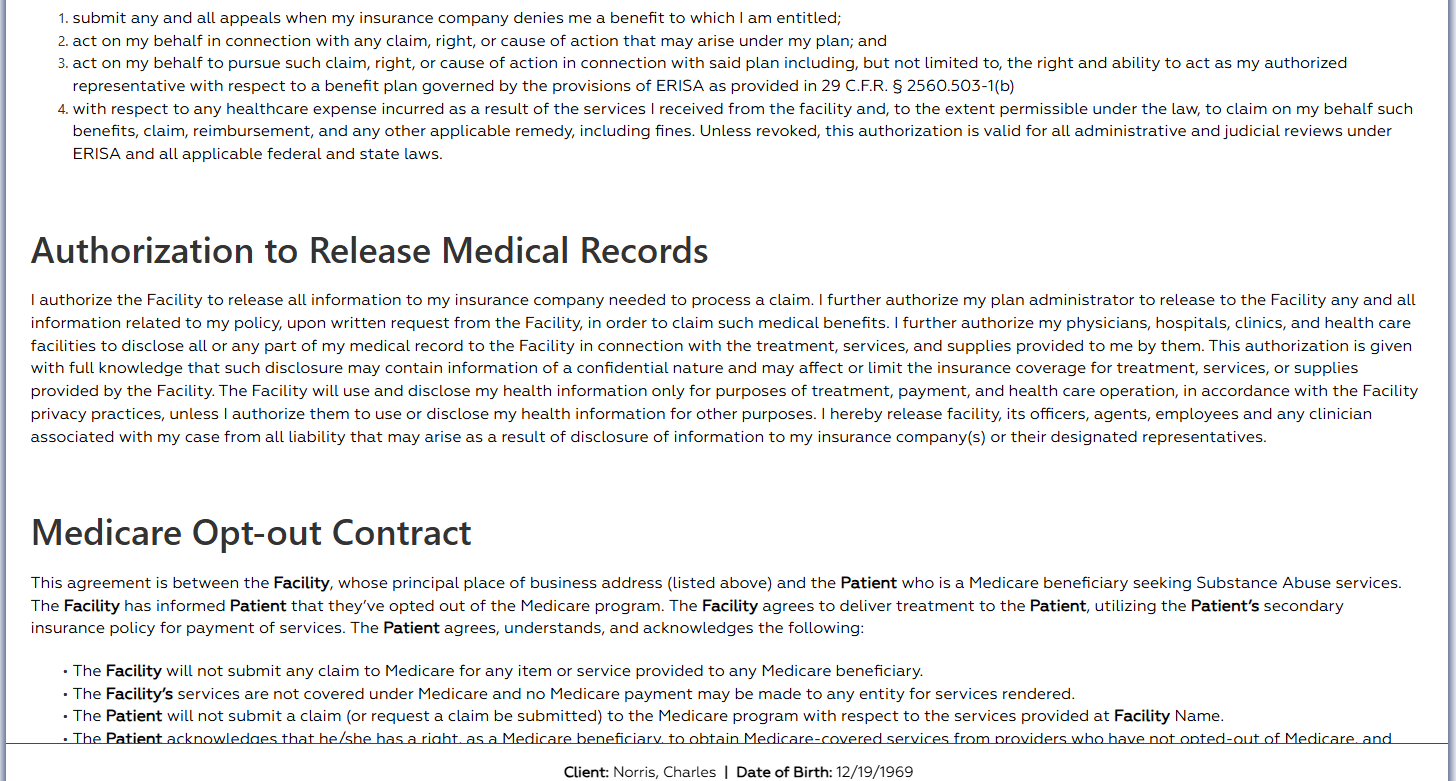 |
| Scheduled Form days due improvements | Admin Tools > Form Builder When creating a Scheduled Form, a user may now assign the form to be first due X number of days after admission, and then mark it as periodically due X times after that. The "due X number of days after admission" feature is already available for Assessment Forms. |
| Reduce duplicate client entry | Admissions > Face Sheet While creating a new client or editing an existing one, if you change the last name field or date of birth field so that those two fields exactly match the last name and date of birth of another client, NextStep will alert you that the client may already be entered in NextStep. This change also improves the warning of duplicate SSNs, displaying the warning when that field is edited, as opposed to waiting for the user to save their changes. NOTE: There may be some false positive warnings, e.g. if there are twins with the same DOB and different first names. In those cases, the warning may be ignored. |
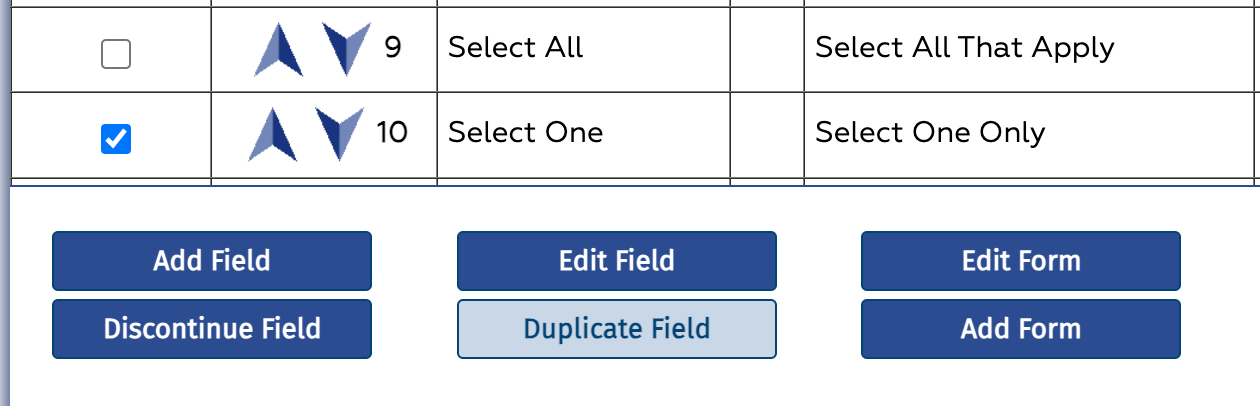
| New option to duplicate fields while building forms | Admin Tools > Form Builder While building forms, you can now select a field, like Select All That Apply, Select One Only, or Dropdown, and duplicate them, including all the selections in the fields.
|
| Total, average and count fields in conditional fields rules | Admin Tools > Form Builder You can now use total, average, and count fields as part of Visible and Required rules in forms. For example, you can create a rule so that, if the score of a survey is greater than some value, the user is required to complete a field with an action to take next. |
Layout improvements to Select One Only and Select All That Apply | Forms The display of the radio buttons assigned to the Field Types Select One Only and Select All That Apply has been improved to make forms more readable. |
Census services added to the Billing Services Dynamic report | Reports > Admin Reports > Billing Services Dynamic The Billing Services Dynamic Report now includes services that have been sealed in Census Billing. The following columns have been added to the report to support Census Billing fields:
|
Display Last Dose in the Medication List on Document Center Face Sheet | Reports > Document Center For Dispensing agencies, if a Medication List field is shown on the Face Sheet, and a client had a Dispensing dose in the current episode of care, that dose will appear on the printable Face Sheet accessed via the Document Center. |
Orders Widget improvements | Client Details Panel > Orders A number of improvements have been made to the Medication section of the Orders Widget:
|
| Usability improvements for required fields. | The shade of red used to highlight required and conditionally required fields on forms has been lightened so that the field labels are easier to read |
| Program Filter on Export Notes | Reports > Administrative Reports > Notes Export The Export Notes report now includes a Program filter. In addition, a Subscript out of range error has been addressed. |
Issues Resolved:
Release 11.19.0 | |
Multi Image Upload field issue | There was an error sealing a form if it contained a required Multi Image Upload field. This issue has been addressed. |
Empty signature issue | A user can no longer submit an empty signature box if the form has a Signature, Touch Signature, or Topaz Signature field type. |
Required dropdown for Permanent Residence field on Face Sheet issue | There was an issue with the Face Sheet in the Form Builder, where when you made the Permanent Resident field Required, when you went back to that field after saving, the Required option was not visible to change. This issue has been resolved. |
User dropdown field type on Note issue | There was an issue when creating/modifying a note type under Note Builder, a User Dropdown field type was restricted based on user permission role or case assignment on the Face Sheet, and that restriction was not being enforced on the note. This issue has been addressed. |
Required fields on Forms issues | A number of issues with the display and navigation of required fields on forms have been addressed. |
Opening Face Sheet issue | There was an issue when a user went to view the Face sheet, either by going to Document Center and clicking the Face Sheet button or clicking the View button on the client details panel. This issue has been resolved. |
Treatment Plan Setup Template would not add new Intervention issue | Admin Tools > Treatment Plan Setup There was an issue on the Treatment Plan builder where the user was sometimes not able to add a new Intervention. This issue has been resolved. |
Fixed copy/paste with Custom Objectives issue | There was an error that could occur when pasting text into a Custom Objective in a Treatment Plan. This issue has been resolved. |
"Variable is undefined: 'FormFields'" error | When opening a Progress Note, users sometimes experienced the error “Variable is undefined: 'FormFields' on PCPCharts.asp in file inc_DynFieldsVBScriptOnly.asp” This issue has been addressed. |
Signing issue when form had required fields. | There was an issue where users who were signing a form, but not sealing it, could not complete the signing because the form contained required fields. This issue has been addressed. |
PDF Template forms containing an uploaded image issue | There was an issue with PDF Template forms that included uploaded images. This issue has been addressed. |
Forgot Password link issue | There was an issue when a user clicked Forgot Password on the login page more than once. This issue has been addressed. |
Release 11.19.2 | |
Scheduled Form Days from Admission Issue | Version 11.19.1 included a new Days from Admission field on Scheduled Forms. There was an issue where Schedule Forms, that did not have Days from Admission set to something other than the default value of zero, were coming due at admission. This hot fix addresses that issue.
|
Release 11.19.5 | |
| Medication Plan Other Active Medications | There was an issue where the Medication Plan was not displaying the Other Active Medication grid contents. This issue has been addressed. |
| Truncation in Progress Note | Some fields in the Progress Note were being truncated after 8,000 characters. This issue has been addressed. |
PharmReview.asp error | There was an issue saving some notes that raised an error referencing PharmReview.asp. This issue has been addressed. |
| Scanning | The scanning module within NextStep was updated to the latest version. |